
CloudDrive2
优点是方便简单,易于操作
缺点是在处理大量文件时性能占用高且加载速度较慢
安装完成后进入http://localhost:19798/
参考CloudDrive - 帮助 (clouddrive2.com) 并按照提示挂载即可
AList+Rclone
优点是性能表现好
缺点是在资源管理器看不到具体容量
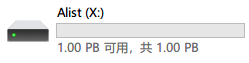
Alist
参考 Home | AList文档 (nn.ci) 安装并添加储存
Linux的开机自启在文档中有详细的教程,这里我不再多说
关于windows的开机自启我是在Alist安装目录创建启动脚本start.vbs
Dim ws
Set ws = Wscript.CreateObject("Wscript.Shell")
ws.run "*/*/*/alist.exe server",vbhide Wscript.quit
并在shell:Common Startup创建快捷方式
Rclone
在程序目录输入
.\rclone.exe config
以创建配置
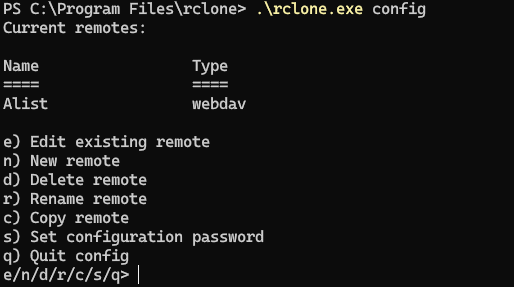
下面是一个配置过程示例
PS C:\Program Files\rclone> .\rclone.exe config
Current remotes:

Name                 Type
====                 ====
Alist                webdav

e) Edit existing remote
n) New remote
d) Delete remote
r) Rename remote
c) Copy remote
s) Set configuration password
q) Quit config
e/n/d/r/c/s/q> n

Enter name for new remote.
name> new

Option Storage.
Type of storage to configure.
Choose a number from below, or type in your own value.
 1 / 1Fichier
   \ (fichier)
 2 / Akamai NetStorage
   \ (netstorage)
 3 / Alias for an existing remote
   \ (alias)
 4 / Amazon Drive
   \ (amazon cloud drive)
 5 / Amazon S3 Compliant Storage Providers including AWS, Alibaba, ArvanCloud, Ceph, ChinaMobile, Cloudflare, DigitalOcean, Dreamhost, GCS, HuaweiOBS, IBMCOS, IDrive, IONOS, LyveCloud, Leviia, Liara, Linode, Minio, Netease, Petabox, RackCorp, Rclone, Scaleway, SeaweedFS, StackPath, Storj, Synology, TencentCOS, Wasabi, Qiniu and others
   \ (s3)
 6 / Backblaze B2
   \ (b2)
 7 / Better checksums for other remotes
   \ (hasher)
~~~~~~~~~~~~~~~~~~~~~~~
54 / Zoho
   \ (zoho)
55 / premiumize.me
   \ (premiumizeme)
56 / seafile
   \ (seafile)
Storage> 52

Option url.
URL of http host to connect to.
E.g. https://example.com.
Enter a value.
url> http://127.0.0.1:5244/dav

Option vendor.
Name of the WebDAV site/service/software you are using.
Choose a number from below, or type in your own value.
Press Enter to leave empty.
 1 / Fastmail Files
   \ (fastmail)
 2 / Nextcloud
   \ (nextcloud)
 3 / Owncloud
   \ (owncloud)
 4 / Sharepoint Online, authenticated by Microsoft account
   \ (sharepoint)
 5 / Sharepoint with NTLM authentication, usually self-hosted or on-premises
   \ (sharepoint-ntlm)
 6 / rclone WebDAV server to serve a remote over HTTP via the WebDAV protocol
   \ (rclone)
 7 / Other site/service or software
   \ (other)
vendor> 7

Option user.
User name.
In case NTLM authentication is used, the username should be in the format 'Domain\User'.
Enter a value. Press Enter to leave empty.
user> admin

Option pass.
Password.
Choose an alternative below. Press Enter for the default (n).
y) Yes, type in my own password
g) Generate random password
n) No, leave this optional password blank (default)
y/g/n> y
Enter the password:
password:
Confirm the password:
password:

Option bearer_token.
Bearer token instead of user/pass (e.g. a Macaroon).
Enter a value. Press Enter to leave empty.
bearer_token>    #直接回车

Edit advanced config?
y) Yes
n) No (default)
y/n> n

Configuration complete.
Options:
- type: webdav
- url: http://127.0.0.1:5244/dav
- vendor: other
- user: admin
- pass: *** ENCRYPTED ***
Keep this "new" remote?
y) Yes this is OK (default)
e) Edit this remote
d) Delete this remote
y/e/d>y

Current remotes:

Name                 Type
====                 ====
Alist                webdav
new                  webdav

e) Edit existing remote
n) New remote
d) Delete remote
r) Rename remote
c) Copy remote
s) Set configuration password
q) Quit config
e/n/d/r/c/s/q>q注意在Option url.选项时一定要在本地Alist路径后加/dav
如http://127.0.0.1:5244/dav
配置完成后就可以启动挂载了
可以参考我的启动参数
"C:\Program Files\rclone\rclone.exe" mount Alist:/ X: --cache-dir Z:\TEMP\Alist --vfs-cache-mode writes --header "Referer:https://www.aliyundrive.com/"关于开机自启我是创建一个rclone.bat脚本
"C:\Program Files\rclone\rclone.exe" mount Alist:/ X: --cache-dir Z:\TEMP\Alist --vfs-cache-mode writes --header "Referer:https://www.aliyundrive.com/"(内容与启动命令相同)
然后在shell:Common Startup创建静默启动脚本rclone.vbs
CreateObject("WScript.Shell").Run "cmd /c *\*\*\rclone.bat",0